Java Intermediate: Cloning

When one thinks of cloning, we think of duplication that is more or less the exact same copy. Java cloning can be different depending on the type of clone.

Clones as we think of them.

To use the clone() method, interface Cloneable must be implemented. An exception called CloneNotSupportedException is thrown to indicate that the clone method in class Object has been called to clone an object, but that the object’s class does not implement the Cloneable interface. To use the clone() method, interface Cloneable must be implemented.

class Clyde_template implements Cloneable {
    int age = 30;
    String greeting = "Hi, I'm Clyde!";

    public Object clone() throws CloneNotSupportedException {
        try {
            return super.clone();
        }
        catch (CloneNotSupportedException e) {
			System.out.println (" Cloning not allowed. " );
            return this;
        }
    }
}

/* Line 1 of our main class here throws the exception. */
    public static void main (String[] args) throws CloneNotSupportedException {

This class implements the Cloneable interface, so we can get started. This class may be outside of our main class, but it is where all of our cloning magic happens. The class template holds an integer and a string. The public Object creates the clone constructor/object for use plus throws and catches necessary exceptions when cloning.

Meet Clyde. Clyde is your average 30 year-old man. Neither is Clyde or Clyde however because Clyde has been cloned once. Then we cloned Clyde’s first clone to make a new clone! This is the difference between a shallow and deep clone.

In Java, a shallow clone:

  • Is jointed. Changing one changes the original object.
  • Do not clone object references, only cloning primitive data types.
  • Is made by default using Java’s clone() method.
public class Sprint4 {
    public static void main (String[] args) throws CloneNotSupportedException {
        Clyde_template Clyde2 = new Clyde_template(); // Creates Clyde2 from Clyde_template.
        Clyde_template Clyde3 = (Clyde_template)Clyde2.clone(); // Creates deep clone Clyde3 from Clyde2.
        Clyde2.age = 20;
        Clyde2.greeting = "Hey, I'm Clyde.";
        Clyde3.age = 5;
        Clyde3.greeting = "Hey, I'm Cwyde!";

        System.out.println("Age " + Clyde2.age + ". " + Clyde2.greeting);
        System.out.println("Age " + Clyde3.age + ". " + Clyde3.greeting);
    }
}

As you can see, using our above Clyde clone template we create a shallow clone named Clyde 2. Then we create a deep clone named Clyde 3. Cloning from any age, we change the age to obtain different versions of Clyde earlier in life. Not all Clyde(s) are the same after all!

With cloning, you can make multiple clones that each perform different actions or even clones that all perform the same act. It’s all up to you!

Follow my original code on my GitHub profile! Sprint4.java is inside the Miscellaneous folder.

Java 101 Interview Questions

If you’re like me, you’re looking to get into Java development. But to leap across that hurdle, you need to be prepared for when your interviewer asks you any questions! Here’s 21 basic Java questions that any Java developer should be able to answer:

  1. What is Java?
  2. What do objects have in common?
  3. What are superclasses to subclasses?
  4. How would one create/define a subclass?
  5. How would one use a method on an object?
  6. Which elements are most common in any Java file?
  7. When would imports be used?
  8. Where would imports be placed?
  9. How many different String methods are already in the String class?
  10. What is String concatenation?
  11. Which import allows for user input?
  12. Are there any limitations to assignment statements?
  13. What is the difference between primitive and reference data types?
  14. What are the rules of precedence?
  15. What is type casting?
  16. When would a constant value be used?
  17. Which Scanner method can be used to input Strings?
  18. Writing your first Java method, what order of declaration is needed?
  19. What are constructors for and where can they not be used?
  20. What kind of access modifiers are there?
  21. Which kinds of if statements exist?

Here are the answers!

  1. Java is a general-purpose class-based object-oriented programming language that follows four fundamentals: Abstraction, Polymorphism, Inheritance, and Encapsulation.
  2. Objects hold data values, methods, and may have the same methods/values created as instances of a class.
  3. A superclass is a class that supports objects (subclasses) that instantiate it.
  4. object = new Class();
  5. int value = object.useMethod();
  6. Comments, import statements, and class declarations make up most common elements in any Java file.
  7. Imports are used to import Java’s main packages and methods, such as java.util.Scanner for scanning user terminal input.
  8. Imports are best placed atop the .java file to ensure their use by the very beginning. Asterisks may be placed on class name as wildcards to import all classes, such as java.util.*
  9. There are almost 50 methods defined in the String class, including an operation called concatenation.
  10. String concatenation is an operation used to combine strings. Whereas a String may be defined as a quoted constant, a concatenation String can be defined as a pair of existing Strings. After defining Str_1 and Str_2 I can define a new String. Example below.
  11. the java.util.Scanner class allows for Scanner user input.
  12. There are no limits to assignment statements. You can assign values to variables as long as the statement supports it. Example below.
  13. Primitive data types are individual values and numerical data. Reference data types represent objects and addresses where object data is stored.
  14. Precedence rules are essentially the order of operations: PEMDAS! Parenthesis, Exponent, Multiplication, Division, Addition, Subtraction.
  15. Type casting takes mixed expressions (such as a statement that multiplies a float value with an int value) and uses promotion rules to use the higher precision data type. Demotion of data type precision is unallowed.
  16. Keyword final is only used when a value must remain unchanged.
  17. The next() Scanner method can be used to input Strings.
  18. <modifier> <return type> <method name> ( <parameters> ) { <statements> }
  19. Constructors create subclasses, but cannot be used with interfaces.
  20. Default, Public, Private, and Protected. If you do not mention any access modifier for class, method or variable, then it is treated as default. The default access modifier is accessible only within same package and cannot be accessed from a different package. Public and private determine accessibility within the same class. Protected is unique as it becomes accessible within the same package as well as within a subclass of a different package. It cannot be applied to a class.
  21. An if statement is made up of control flow and relational operators and can be compound statements, else-if statements, or even nested-if statements.
10. /* The following String concatenation should print out "doghouse" */
String Str_1 = "dog";
String Str_2 = "house";
System.out.print(Str_1 + Str_2);

12. /* We assign value to a variable using an assignment statement. */
int three;
int one;
int two;
three = one + two;

18. /* We declare order on line 1 of the method. Access modifier, data returned, method name, parameters (which is commonly left as null) and inside the method we place all of our statements, loops, and variables. */
public static void main(String[] args) {
        System.out.println("This is a test.");
    }


Can’t get stumped as easily on interview questions with a comprehensive Java overview!

Java Basics: If Statements

If statements are a cornerstone of programming, even outside of Java such as C++ or other languages. An If statement proposes a possibility, a noticed change in the running program, whether it’s how to treat different inputs with output, different ways to handle changing data, etc. There are several different kinds of if statements that are used:

  • Basic If Statement: if (value == num) System.out.println(“Value matches number!”);
  • Else-If Statement: if (value == num) System.out.println(“You guessed my number!”); else System.out.println(“Wrong number!”);
  • Compound If Statement: if (value >= num) { System.out.println(“Value matches number…”); System.out.println(“…or value is greater than number!”); }
  • Nested If Statement: if (value != num) { if (value > num) System.out.println(“Value is definitely greater than number!”); }

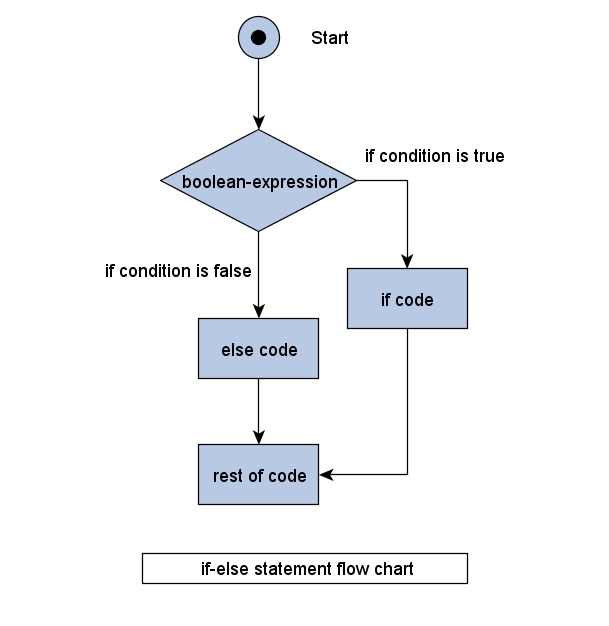
All of these use syntax of: boolean expression, then test and control flow. A control flow is a visualization of all if statement possibilities. Observe:

With if statements, many possibilities can be explored. You can create a mere data check or mimic a switch statement with a series of complex else-if statement. The power is at your fingertips!

GitHub: Usage and Commitment

GitHub is one of many different repositories: BitBucket, GitKraken, and more! But to use a repository service is to host a collection of files that act together as one cohesive project. Today I am going to show you how my GitHub was made!

GitHub’s mascot, OctoCat!

First, you must make an account. There are various features and perks to having a GitHub account, such as following your favorite GitHub builders to see what repositories they make or work on next!

Second, you need to create a repository! Install GitHub to Desktop, then follow through its installation process. Once you install GitHub and reach its directory, you can create a repository in two ways:

  • Create a New repository on GitHub’s website itself.
  • Load the Git Bash on your computer’s new directory and use the git init command to create a new repository.

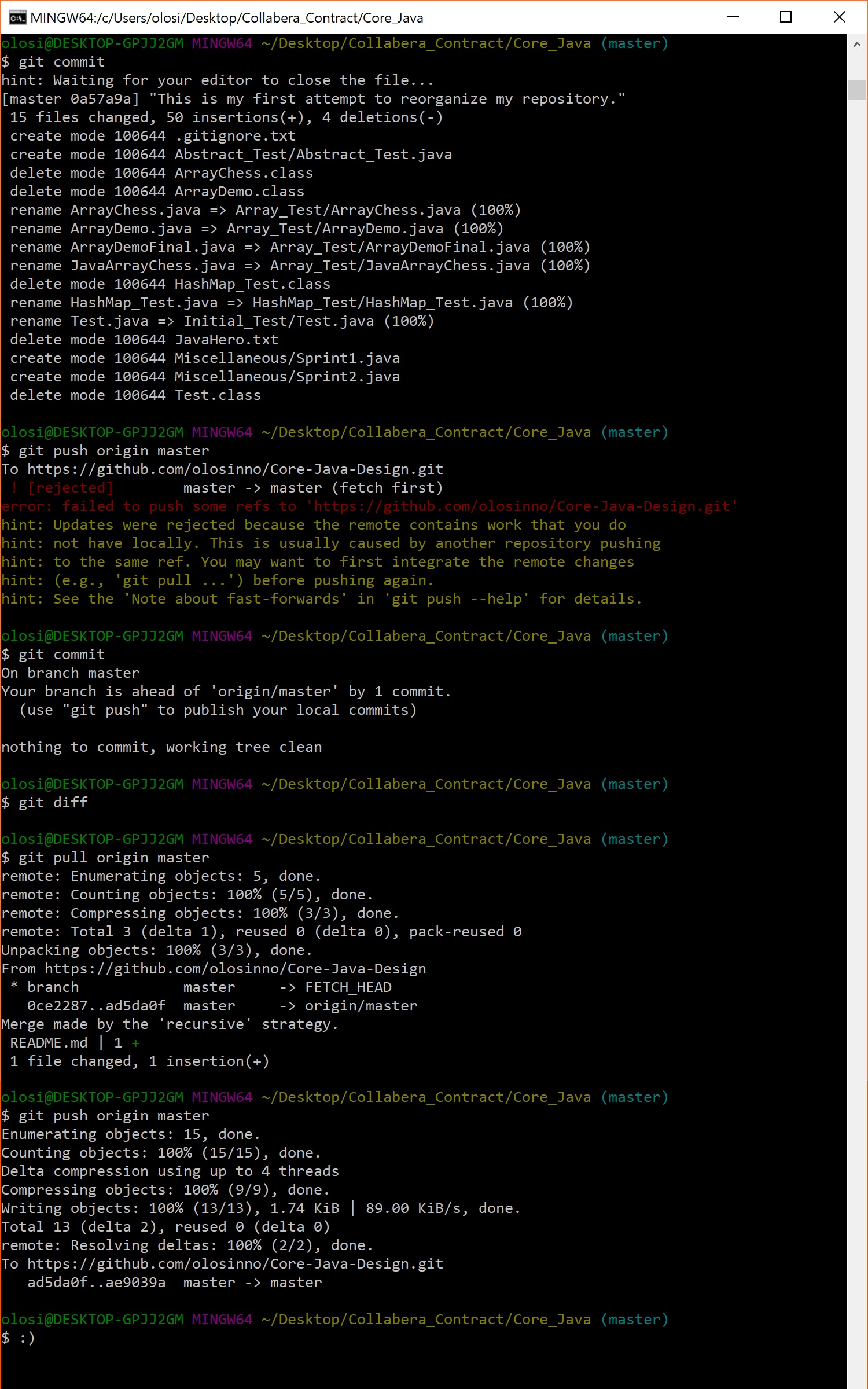
Once you have a new repository, there are several commands to know and use to prepare, discard, add, remove, and otherwise change files and folders for committing to your new repository. When I had originally created my repository, I used git add * to add all of my files, but it was a mess! It was disorderly and the files were all over the place! I decided for my blog related Java code that I would put it all under one repository with each project occupying its own subfolder. During this cleanup however, I ran into an issue:

Following the hints on command line during my failed push turned out to be very helpful! I pulled, then pushed – like opening a stubborn door! At last I had achieved a clean repository!

However, my work isn’t done. I must continue to develop core java design! Only then can anybody who reads my posts can write clean, organized, and sensible object-oriented programming code! This has been a bonus post, thanks for reading!

Java Basics: Inheritance

Inheritance is a cornerstone of Java development, in the forms of abstract classes and interfaces. An abstract class isn’t concrete: it’s an idea to be drawn upon by extending classes. As plants draw upon sunlight to use photosynthesis, we can use an abstract class to create extended classes.

abstract class Foliage {
    abstract int getHeight();
}
class Bush extends Foliage {
    int height = 12;
    int getHeight() {
        return height;
    }
}
class Tree extends Foliage {
    int height = 60;
    int getHeight() {
        return height;
    }
}

With our abstract class, all extending classes must have the getHeight function. Both Bush and Tree are classes extending abstract and can include other data, unlike objects implementing interfaces.

public class Abstract_Test {
    public static void main(String[]args) {
        Foliage f;
        f = new Bush();
        System.out.println("The common Lilac bush is about " + f.getHeight() + " feet (4 meters) tall.");
        f = new Tree();
        System.out.println("The average tree is about " + f.getHeight() + " feet (20 meters) tall.");
    }
}

Unlike an interface, here we can adjust our abstract value, changing it to Bush, then Tree. Using abstract classes we can grow tall in our Java knowledge!

A New Zealand cabbage tree!

Interfaces are much different than abstract classes. Unlike an abstract class, you can only have abstract methods in an interface, declare an interface’s variables as constants, Interfaces are slow, lack constructors and even lack access modifiers, making everything public! Why ever use interfaces over abstract classes? Is there a reason you can think of? Leave an answer in the comments below and I will respond to your answer!

Follow my original code on my GitHub profile!

Java Basics: HashMaps

A hashmap is unique in that it’s similar to an array, but is made up of pairs of data: keys and values. Hashing converts large Strings to small Strings that represent the same String. The hashmaps keys and values can even be more than Strings – you could work with any pairing!

import java.util.HashMap;
import java.util.Map;
import java.util.Iterator;
import java.util.Set;

For this example we will be using Iterator and Set as well.

HashMap <Integer, Boolean> isEven = new HashMap<Integer, Boolean>();

In my example, I’m using Integer keys with Boolean values to create isEven – a new hashmap!

      isEven.put(3, false);
      isEven.put(8, true);
      isEven.put(45, false);
      isEven.put(84, true);
      isEven.put(100, true);

Add multiple elements to this new hashmap using its innate put method.

      Set set = isEven.entrySet();
      Iterator iterator = set.iterator();
      while (iterator.hasNext()) {
         Map.Entry mapEntry = (Map.Entry)iterator.next();
         System.out.print("Key is "+ mapEntry.getKey() + " and value is ");
         System.out.println(mapEntry.getValue() + ".\n");
      }

Then display this content using both Iterator and Set to prepare set hashmap prints in a while loop. Perhaps a ForEach loop could have worked better upon reflection.

      isEven.remove(3);
      System.out.println("Map key and values after removal: \n");
      iterator = set.iterator();
      while (iterator.hasNext()) {
         Map.Entry mapEntry = (Map.Entry)iterator.next();
         System.out.print("Key is "+ mapEntry.getKey() + " and value is ");
         System.out.println(mapEntry.getValue() + ".\n");

We can also remove specific hashmap entries with remove, playing counter to the put method we had originally begun with.

If you plugged this in and made your own hashmap, you may have noticed that it doesn’t spit out the same hashmap elements in the same .put order. Why is this? Write your answer in the comments below!

Follow my original code on my GitHub profile!
Credit to my partner Abdul Raza for his help!

Java Basics: Arrays

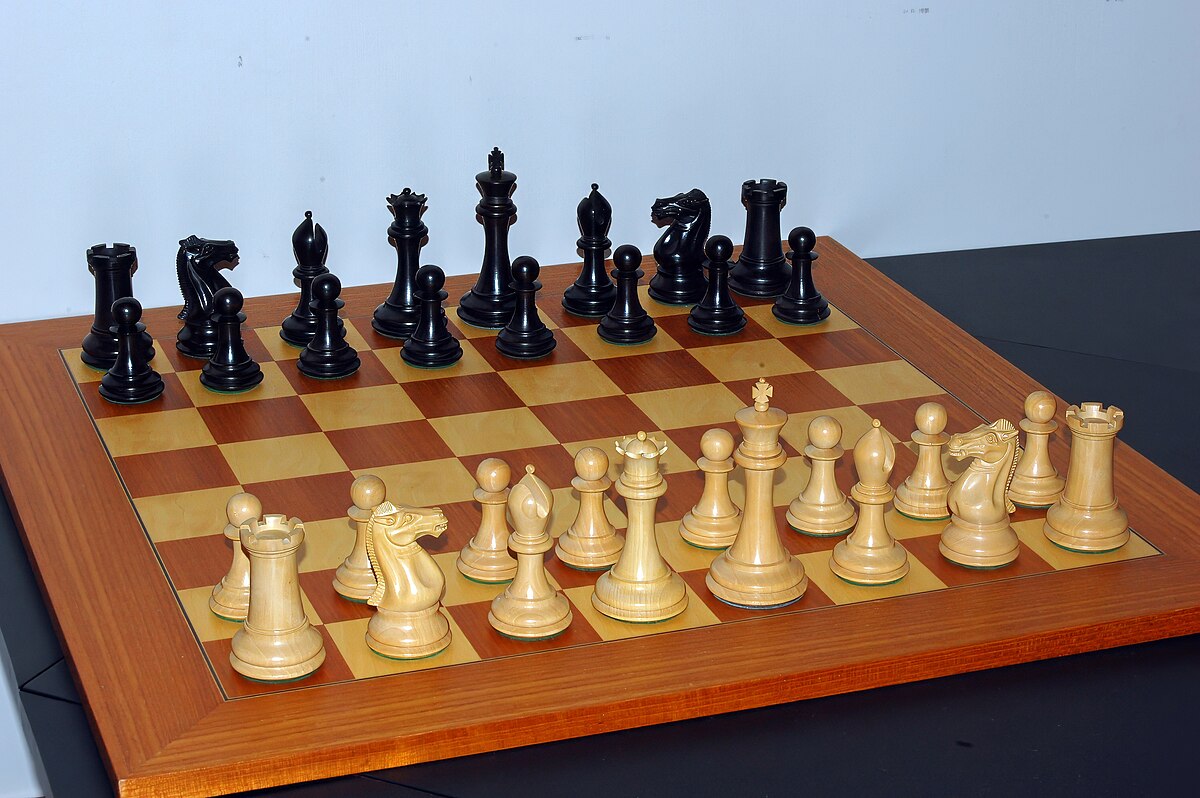
A chess board may be 8×8, but a two-dimensional array can be any size!

I think it would be a tragic statement of the universe if Java was the last language that swept through.

— James Gosling, founder of Java programming language.

A Java array is typically a collection of same data types which have a united memory location. We can store only a fixed set of data types in a Java array, but we can create/use an index to move through an array, as a wheel on a road. The first element of the array is stored at the 0th index, 2nd element is stored on 1st index and so on.

Chess is a board game with 8×8 squares. From left to right on the player’s side the closest row has: a Rook, a Knight, a Bishop, the Queen, the King, a Bishop, a Knight, and a Rook. The second-closest row has only Pawns, the most populous player piece.

Arrays by dimensions must be programmed differently. A one-dimensional array and a two-dimensional array differ in complexity. Observe:

String[] chessRow = new String[8]
String[][] chessGrid = new String[8][8]; // chessGrid strings represent pieces on the first and last rows of the board.

Our string, chessRow, is made up of a single row of 8. It’s important when setting up an array for it to be its number (rather not its number minus one) when being initialized because not doing so will flip the chess board and crash Java. After initialization, know that the first array element is in slot 0. To progress through it requires creating an index that loops iterating through it.

Our second string, chessGrid, is made up of two rows of 8. To progress through this two-dimensional array requires nested two looping iterators. Observe:

for (int y = 0; y < 8; y++) {
      for (int x = 0; x < 8; x++) {
            if ((y == 0)||(y == 7)) { // already initialized
                  }
            else if (y == 1) {
                    chessGrid[y][x] = "Black Pawn";
                  }
            else if (y == 6) {
                    chessGrid[y][x] = "White Pawn";
                  }
            else {
                  chessGrid[y][x] = "None";
                  }
            }
      }

The primary (first) for loop contains “vertical” piece movement, beginning at 0 or Black Rook. The secondary for loop contains “horizontal” piece movement, beginning at 0 also Black Rook. The else if statements reflect scanning starting Pawns adjacent to the main pieces at both ends of the Chess board.

And that’s how a two-dimensional array can simulate reading a Chess board, with a grid! While there can be more than two dimensions in an array, I’m not going there in this blog, here in Java programming or in Chess!

Strato Chess, taking Chess to another dimension!

Follow my original code on my GitHub profile!
Credit to my partner William Clark for his help!

Introduce Yourself (Example Post)

To introduce myself, I am Omran Losinno.

I am an individual man who has several accomplishments:

  • I graduated from Penn State University with a Bachelor’s Degree in Informational Sciences & Technologies.
  • I worked with multiple hospital networks to successfully integrate EPIC software systems, a new and comprehensive software system that covers all aspects of hospital work from the registration desk to surgery tables.
  • I have worked on and led multiple game development projects such as 3D platformers or roleplaying games.

My current main hobby is hosting Dungeons & Dragons, a TTRPG (tabletop roleplaying game) which has been ongoing for 4 years now. It is a fun and engaging hobby shared with a group of friends as players.

With teamwork, a party of players can overcome anything!

I am currently accepting players to start next Monday night, inviting anybody, even people with no gaming experience whatsoever.

Design a site like this with WordPress.com
Get started