Today I would like to show off a new piece of software I downloaded: Spring Tools Suite! Based on Eclipse, it is a complex IDE (Integrated Developer Environment) for use with proper project management. Allow me to demonstrate how…

Rather than creating a file, Spring Tool Suite allows you to create an entire project with packages and any files within. I will go over the initial tooltip line from left to right.
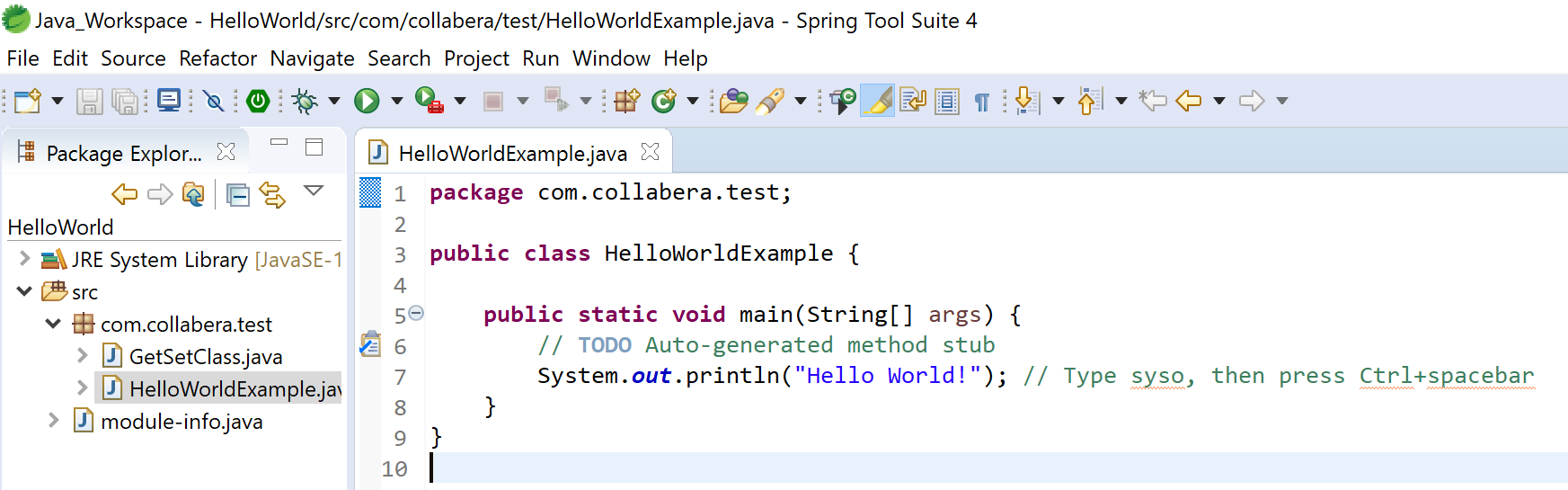
- New: This comes with a drop-down menu and is also in File. It can help you create almost any project folders, packages, or anything else you may need.
- Save: Self-explanatory. You’ll be using this alot.
- Save All: Handy for when you’re working with multiple files.
- Open a Terminal: For when the terminal must be used, such as compiling.
- Skip All Breakpoints: Skips all breakpoints. Can be used when parsing code for lines’ scope or order errors.
- Boot Dashboard: An additional view mode, this grants you the ability to both quickly access and run multiple applications simultaneously! For when you’re too busy debugging/testing too many different code files.
- Debug: This may come with a drop-down to debug different project scripts.
- Run: Instead of triggering run in the terminal, you can use this handy button here instead.
- Run From Last: Grants different external tool usage.
- Stop: Stops a running script.
- Relaunch: Restarts a running script.
These are the core features of Spring Tool Suite that make it the superior IDE for usage with complex multi-file and even multi-package Java projects! I will certainly be using it in the future for any big projects that would require me to draw a UML flowchart, which I will soon be getting into. Cheers!
 Omran Losinno