While this is mainly a Java blog, I will soon need a database to use for an upcoming personal project. So I took up MySQL! Using its Workbench, I can make and host tables online. Here is a written example:
create testDB;
use testDB;
create table BLAZER_DAY (
id INT(1) NOT NULL AUTO_INCREMENT PRIMARY KEY,
day CHAR(10)
);

describe BLAZER_DAY;
use BLAZER_DAY;
After creating a database, we create a table. At my workplace there is a new fashion policy requiring us to wear blazer jackets each Monday and Thursday. We can demonstrate this policy using a table named BLAZER_DAY. Each table in MySQL has a primary key that numbers and increments along each row with our other column’s data, column name day. Column day will list characters up to ten digits in length.
Then we can see what this table would look like or be shaped like before we declare our usage of it, as we declared the use of our test database. Now that our database is created, we must populate it with our data!
INSERT INTO BLAZER_DAY (day) VALUES ('Sunday');
INSERT INTO BLAZER_DAY (day) VALUES ('Monday');
INSERT INTO BLAZER_DAY (day) VALUES ('Tuesday');
INSERT INTO BLAZER_DAY (day) VALUES ('Wednesday');
INSERT INTO BLAZER_DAY (day) VALUES ('Thursday');
INSERT INTO BLAZER_DAY (day) VALUES ('Friday');
INSERT INTO BLAZER_DAY (day) VALUES ('Saturday');
Our database now has the seven days of the week! Finally, we must update both blazer days with declarations of when we must wear blazer jackets.
UPDATE BLAZER_DAY SET day = "Blazerday!" WHERE id IN (2);
UPDATE BLAZER_DAY SET day = "Blazerday!" WHERE id IN (5);
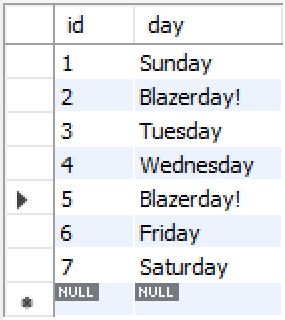
With this table, everything becomes clear! Everybody who sees this table should now know when to wear a blazer during the week.
Follow any of my SQL work on a separate GitHub repository!
 Omran Losinno